New games




Sprunkybox
About Sprunkybox
With 20 characters and only seven stage slots, Sprunkybox turns every music choice into a creative challenge. Each monster adds a new sound, and the right combination can reveal hidden songs.
Create Spooky Music in Sprunkybox
Sprunkybox is a Halloween-themed music game featuring cute felt monsters, spooky effects, beats, and vocals. Drag characters onto the stage and listen to how their sounds blend.
You've only got seven slots, so don't just dump characters in. Try swapping a couple around and stacking different layers you'll usually find a combo that works better than whatever you threw together first.
Three Ways to Experiment With the Soundboard
Test Each Layer Before Replacing It
- Pick a beat that sets the pace for your track.
- Add a bass character to fill out the sound.
- Try a melody that works with the beat.
- Throw in a singing character or a creepy sound and see how it turns out.
- If one character sounds weird with the others, kick it off the stage and try someone else.
Treat Character Swaps as Experiments
- Save a mix you like before trying something new.
- Switch just one character and see what happens.
- Notice which sounds blend well and which throw off the track.
- Mute the others for a moment to hear one character on its own.
- Didn’t like the new mix? Put the previous character back.
Search for Hidden Musical Combinations
Sprunkybox also rewards players who experiment beyond ordinary music-making. Certain character combinations trigger music badges above their heads, unlock secret songs, and add discoveries to the Music Book. There are 19 hidden songs to find, plus a legendary full-song combination.
This turns the soundboard into a puzzle with clues to follow. A successful mix is not always the one that sounds best at first; sometimes, the goal is to discover what happens when particular characters share the stage.
Light Mode vs. Dark Mode
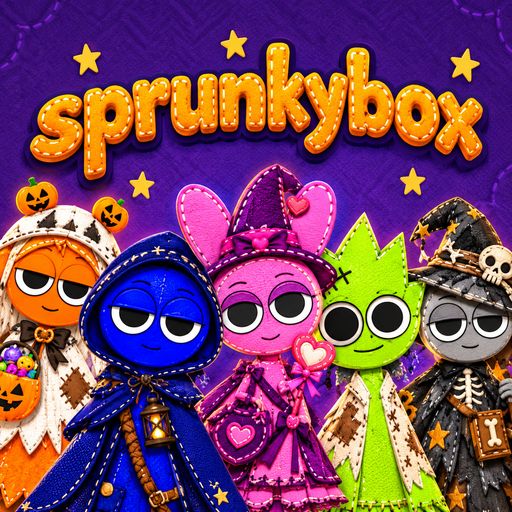
The two visual worlds give the same character-based music system different moods. Light mode presents a cozy purple Halloween setting, while Dark mode transforms the cast into creepier versions with darker sounds.
To activate Dark mode, drop the mysterious Black character onto the stage. The change gives players another reason to revisit familiar combinations and listen to how the altered atmosphere affects their compositions.
Sprunkybox Controls
- Mouse or touch: Drag, drop, click, and tap characters.
- Space: Restart the mix.
- F: Enter full-screen mode.
- Esc: Close an open panel.
Make Your Own Halloween Music in Sprunkybox
Sprunkybox works best when you treat its characters as individual parts of a larger composition rather than decorations to place on a stage. Seven slots force you to make choices, while hidden songs give those choices a second purpose beyond creating a catchy track.
Experiment with different sound layers, swap characters one at a time, and check the Music Book as you uncover new combinations. Play Sprunkybox online and see how many secret songs you can discover before settling on your favourite Halloween soundtrack. If you enjoy experimenting with different combinations in Sprunkybox, try Anomalous Coffee Machine, where typing different words into a strange machine can lead to some unexpected results.
Psychological Horror